Crumbl
- 4.8
- Rating
- 5.00M
- Installs
- Free
- Price

 Analysis by App-foxy
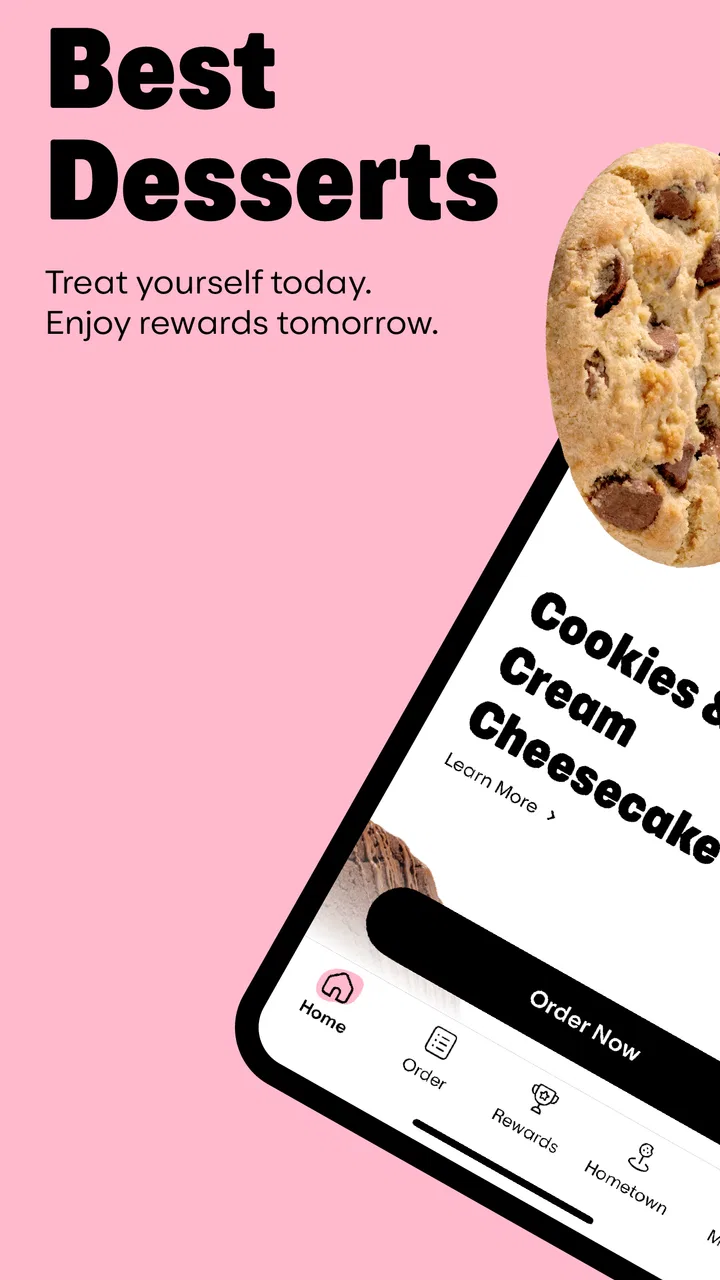
I installed Crumbl expecting a straightforward way to order cookies, but I ended up paying more attention to how the app handles the ordering relationship around the food itself. It is a free Food & Drink app from Crumbl Franchising, LLC, and its central promise is simple: browse what is available, place an order, and build rewards through the app instead of handling everything at the counter.
That simplicity is the main reason to try it. If you already buy from Crumbl, the app can make repeat visits more organized. If you are only curious about the weekly selection, it gives you a more direct route to browse and decide before leaving home. My experience was most positive when I treated it as a planning and checkout tool, not as a general food-discovery app.
How the app fits into a real Crumbl visit
The first thing I noticed is that the app is designed around a specific brand rather than a broad restaurant marketplace. That focus keeps the experience easier to understand than a delivery platform filled with unrelated restaurants, fees, menus, and search results. You are there for Crumbl, so the useful path is relatively clear: look at the current choices, select what you want, choose the relevant order method, and review the purchase before confirming.
You May Also Like

 Blood Strike: 2.5 Anniversary
Blood Strike’s Loadouts Turn Every Drop Into a Tactical Gamble
A close look at Blood Strike’s custom loadouts: how fast access to signature weapons reshapes its battle royale rhythm, rewards preparation, and narrows the gap between fights.

 Pandora - Music & Podcasts
Pandora’s Music Is Easy to Start, but Harder to Recover
Pandora’s strength is its low-effort path from a seed to a station. Its weak spot is how much confidence it asks you to place in connection, setup, and quiet recovery.

 8 Ball Pool
 Is Built on Rivalries, Rematches, and Routine
A close look at the rivalries, rematches, shared routines, and unanswered safety questions that turn a quick pool match into a persistent mobile community.

 Samsung Music
’s Quiet Strength Is Playing What You Already Own
Its reach comes less from spectacle than from dependable access to a personal library. That simplicity is both the app’s strongest retention engine and its ceiling.

 AccuWeather: Weather Radar
AccuWeather Review: A Quick, Clear Forecast for Everyday Decisions
For everyday plans, the best forecast is the one you can understand quickly. AccuWeather makes rain timing, radar, and local conditions easy to act on, with a few trade-offs.

 Hill Climb Racing
Why Hill Climb Racing Still Turns Crashes Into One More Run
A tiny car, a bumpy hill and one more upgrade: Hill Climb Racing keeps resurfacing because its simple chaos makes every near-miss feel personal.
More From Our News Desk
View All News


That narrow purpose is also its biggest limitation. I would not install it expecting restaurant comparisons, meal planning, grocery suggestions, or a way to order from several businesses at once. It is best for people who already have a reason to visit Crumbl. For everyone else, a normal map app or a multi-restaurant service may be more useful for deciding what to eat in the first place.
A realistic example is a busy Friday afternoon when I want to bring a box to a small gathering. Instead of relying on memory at the counter, I can check the available selection, think through how many items I need, and prepare the order before arriving. That reduces the pressure of making a decision while other customers are waiting. It also makes it easier to notice whether I am ordering for a group or simply adding an impulse treat for myself.
I found that this planning role matters more than the novelty of ordering from a phone. The app gives the purchase a little structure: I can pause, reconsider the quantity, and inspect the basket rather than making a quick decision in front of the display. For larger orders, that extra moment is useful because a small mistake in quantity or pickup choice is more annoying once the order has been submitted.
What the rewards system adds to repeat visits
The app also connects ordering with Crumbs, the reward currency referenced in its store messaging. In practical terms, this makes the app more appealing to regular customers than to someone making a one-time purchase. A person who visits occasionally may not care about tracking progress, while a frequent customer has a reason to keep using the same account and ordering route.
I recommend checking the reward area before placing an order rather than treating it as an afterthought. That habit helps you understand whether a purchase is being connected to your account and whether an available reward is relevant to the order you are about to make. It is a small workflow change, but it prevents the common frustration of discovering after checkout that you should have reviewed the reward options first.
The trade-off is that rewards can encourage loyalty to one chain even when another option would be more convenient or cheaper for the occasion. I would not let an accumulating balance decide every food purchase. The reward system is a useful bonus if Crumbl is already your choice; it is a weaker reason to choose the brand when location, timing, dietary needs, or budget point elsewhere.
Because the app is free, the cost question is mainly about the order rather than downloading the software. I still pay attention to the final review screen, especially when adding items for several people. A convenient interface can make it easy to increase the basket without noticing, so I consider the total and the selected fulfillment method before completing anything.
Trust begins with visible choices
For me, trust in a food-ordering app is not just about whether the buttons work. It is also about whether I can tell what I am doing at each stage. A trustworthy experience should make the selected store, order details, account connection, and final confirmation understandable before the purchase is sent through.
That is where I judge Crumbl most favorably: its purpose is concrete, and the user journey is tied to an identifiable purchase rather than an endless feed. I can approach it with a clear question—what is available, how much do I want, and how will I receive it?—instead of feeling pushed to browse unrelated content.
Still, I would not confuse a focused interface with complete privacy information. When an app involves accounts, ordering, rewards, and location-related decisions, I take a moment to read the permission prompts and privacy explanations shown on my device and in the app. I do not approve access automatically just because the app is convenient. If a function works without a permission, I prefer leaving that permission off.
This is especially important for location access. Finding a nearby store can be helpful, but I would rather choose a location manually when that is available than grant continuous access without thinking about it. Manual selection takes a few extra seconds and gives me a clearer sense of what information I am sharing. The right choice depends on how often I order and how much convenience I want, not on a blanket assumption that every permission is necessary.
Account control matters more than a quick checkout
The account side deserves attention because rewards are more useful when purchases are connected consistently, but that same connection creates a record of activity that I prefer to manage deliberately. I would use an account for regular visits, yet I would avoid creating multiple accounts simply to chase a short-term benefit. Fragmented accounts make rewards harder to follow and can make it less clear where order history or account controls belong.
Before signing in, I look for the ordinary controls a user should expect: whether I can review profile details, change communication choices, sign out, and understand how to stop using the account. I also check whether the app asks for information that is actually relevant to ordering. If I am uncomfortable with a requested detail, I would rather investigate the available account options than enter it casually.
My advice is to separate ordering convenience from marketing convenience. Notifications about an order can be useful, particularly when I am waiting for a pickup, but promotional messages are a different choice. I keep only the alerts that help me complete or manage an order and turn off anything that feels distracting. This makes the app calmer and gives me more control over why it is installed.
That distinction is easy to overlook because food apps often combine practical updates with promotions. I do not see that as a reason to reject Crumbl, but I do see it as a reason to review notification settings after installation rather than leaving every option enabled. A few minutes of setup can prevent the app from becoming a source of unwanted interruptions.
Where data-sensitive moments appear
The most sensitive moments are not limited to account creation. They also appear when I select a store, decide how an order will be fulfilled, apply rewards, and confirm payment. Each step links my preferences to a specific transaction, so I slow down whenever the app moves from browsing to commitment.
I pay particular attention to the final order summary. I want the quantity, selected items, store, timing, and fulfillment choice to match what I intended. This is both a money-saving habit and a privacy habit: fewer accidental changes mean fewer unnecessary corrections, cancellations, or support conversations tied to the account.
I also avoid saving payment details unless the convenience is worth it to me. A saved method can make repeat ordering faster, but entering payment information each time gives me a deliberate checkpoint. Neither approach is automatically right for everyone. I would choose storage only on a device I control and protect, and I would remove access or sign out if I were using a shared phone.
Another useful habit is reviewing the app after an order rather than deleting it immediately. If I need the receipt, reward progress, or order status, the account may be the fastest place to find it. Once those tasks are finished, I can decide whether keeping the app installed still serves me. This avoids both extremes: leaving it permanently active without thought or removing it before I have checked the information I need.
What I would change in my own routine
I would use the app in three distinct ways. For a planned group order, I would browse first, count the people I am buying for, and review the basket twice. For a normal personal visit, I would check the reward area before checkout and avoid adding items merely because the process is easy. For a one-time visit, I would probably use it only if the app offers a clear advantage over ordering in person.
I would also choose manual store selection when I already know where I am going. That keeps the process predictable and avoids giving location access more importance than it deserves for a single order. If I were traveling or unfamiliar with an area, location-based help could be more convenient, but I would still review the result before submitting the order.
A less obvious benefit is using the app as a decision buffer. When I browse while standing in line, I am more likely to order quickly and overlook the total. Preparing the order away from the counter gives me room to compare the size of the purchase with the occasion. This is not a dramatic feature, but it is a practical advantage that changes how I use the app.
The opposite is also true: ordering ahead can make me less flexible. If plans change, I may need to manage the order through the app or contact the store rather than simply deciding not to buy. I therefore avoid placing an order too early for uncertain plans. The app is strongest when I know the location and timing, not when the day is still changing.
Who should use it and who should skip it
I think Crumbl is a good fit for regular customers who want a repeatable ordering routine, people organizing a box for friends or coworkers, and users who value having rewards connected to their purchases. It is also suitable for someone who prefers reviewing an order privately before arriving instead of making every choice at the counter.
I would skip it if I rarely buy from Crumbl, dislike creating accounts for occasional treats, or prefer keeping food orders inside one general-purpose service. I would also choose another option if I need broad restaurant discovery, consolidated delivery, or a single place to compare different businesses. This app is not trying to solve those problems, and installing it for them would likely feel unnecessary.
People with strict dietary requirements should make their decision based on the information and choices presented for the specific order, not simply on the existence of a dedicated app. A polished checkout does not replace careful ingredient questions or direct confirmation when a food choice has serious consequences. In that situation, I would use the app only as one part of the process and contact the store when clarification is needed.
Families and shared-device users should think about account separation as well. I prefer not to leave a food-ordering account open on a phone that several people use, especially when rewards and payment choices are involved. Signing out, using device protection, and checking the account before ordering are simple steps, but they matter more than saving a few seconds.
Performance, maturity, and everyday practicality
The app has been available since early 2019, and its current version is 7.3.0. It supports devices running Android 8.0 or later, which makes it accessible to many existing Android users without requiring a recent flagship phone. That broad compatibility is helpful for a utility app whose value depends more on dependable access than on advanced visual effects.
Its popularity also gives me some context when deciding whether it is worth trying. It has passed one million installs, with an average rating of 4.8 from around 760 thousand ratings and roughly 69 thousand written reviews. Those figures suggest that many customers find the basic experience useful, although they do not guarantee that every store, device, account, or order will behave identically.
I treat ratings as a starting point rather than proof. A food-ordering app can receive praise for convenience while still frustrating users when a store is busy, an item changes, or an account issue needs attention. My own standard is whether the app helps me make a correct order and gives me enough control to review it. On that measure, it is more convincing as a practical companion than as an essential app for everyone.
The Everyone content rating is consistent with the app’s ordinary shopping purpose, and the download itself is free. Those facts make trying it low-risk from an installation standpoint, but I still separate free access from purchase decisions. The app does not make the underlying order free, and a fast checkout should never replace checking what I am actually buying.
My cautious verdict
After using it, I see Crumbl as a focused ordering and rewards tool with a clear audience. It works best when I already intend to buy from Crumbl and want a more deliberate way to browse, prepare, and track the purchase. The app’s strongest quality is not that it transforms the food-ordering category; it is that it keeps a specific brand’s repeat-order process in one place.
I also appreciate that the user can make sensible choices around access and notifications instead of treating convenience as an all-or-nothing decision. I would review permissions, keep location access limited to what I need, separate useful order alerts from promotions, and check the final basket carefully. Those habits make the experience feel more controlled and reduce the small mistakes that can turn a quick order into an unnecessary hassle.
The limitations are equally clear. It is not a replacement for a broad delivery marketplace, it may be excessive for an occasional customer, and rewards should not pressure me into purchases that do not fit the occasion. Anyone with important dietary questions should verify details directly rather than relying on a smooth interface.
My recommendation is straightforward: install it if Crumbl is already part of your routine, but use the account, permission, and notification controls intentionally. For a regular customer, the combination of advance ordering and Crumbs can justify keeping it. For everyone else, ordering in person or using a broader food app may be the simpler choice.
FAQs for Crumbl
01What is the Crumbl app used for?
The Crumbl app is designed to enhance your experience with Crumbl Cookies by allowing you to order cookies directly from your smartphone. You can browse the weekly rotating menu, customize your order, and choose between delivery, pickup, or shipping options. It simplifies your access to Crumbl’s delicious offerings and keeps you updated on new flavors.
02How does the weekly rotating menu work in the Crumbl app?
Crumbl’s menu features a unique rotating selection of cookies every week. The app provides users with a preview of the upcoming flavors, allowing them to plan their orders accordingly. This rotation ensures that there’s always something new to try, keeping the experience exciting and fresh for cookie enthusiasts.
03Can I track my Crumbl order through the app?
Yes, the Crumbl app offers real-time order tracking. Once you place an order, you can monitor its progress from preparation to delivery. This feature provides peace of mind by keeping you informed about when to expect your delicious cookies, whether you’ve chosen delivery, pickup, or shipping.
04Are there any loyalty or reward programs available in the app?
The Crumbl app includes a loyalty program that rewards frequent customers. By making purchases through the app, you can earn points that can be redeemed for discounts or free items. This program is a great way to save money while indulging in your favorite Crumbl treats.
05Is the Crumbl app available on both Android and iOS devices?
Yes, the Crumbl app is available for both Android and iOS devices. You can download it from the Google Play Store for Android devices or the Apple App Store for iOS devices. The app is designed to provide a seamless and user-friendly experience across both platforms.
Pros
- User-friendly interface for easy navigation.
- Wide variety of cookie flavors weekly.
- Convenient in-app ordering system.
- Real-time order tracking feature.
- Engaging loyalty rewards program.
Cons
- Limited delivery areas currently.
- App notifications can be excessive.
- No customization for cookie orders.
- Requires frequent app updates.
- Occasional app crashes reported.

Crumbl
Gallery